How to decompress ZIP files?

About ZIP:
The format was originally designed by Phil Katz for PKZIP. However, many software utilities other than PKZIP itself are now available to create, modify, or open (unzip, decompress) ZIP files. Microsoft has included built-in ZIP support (under the name "compressed folders") in later versions of its Windows operating system.
The ZIP file format is a popular data compression and archival format. A ZIP file contains one or more files that have been compressed, to reduce their file size, or stored as-is.
ZIP files generally use the file extensions ".zip" or ".ZIP" and the MIME media type application/zip. Some software uses the ZIP file format as a wrapper for a large number of small items in a specific structure. Generally when this is done a different file extension is used.
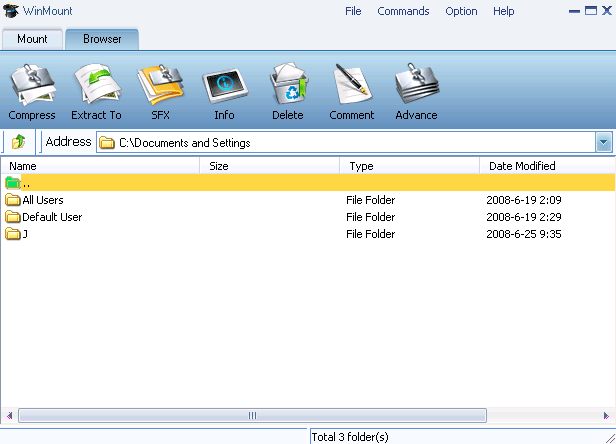
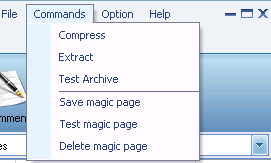
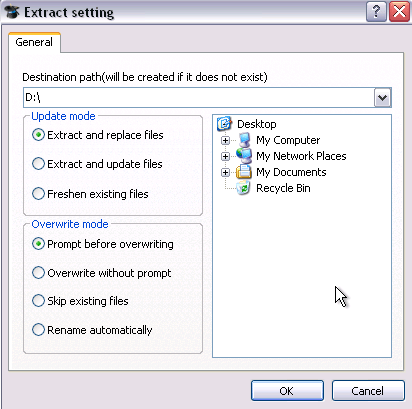
WinMount supports decompressing ZIP files, there are 2 ways:
The 1st method.
1) Select "Option" menu on the WinMount main interface, Select the "View -> Browser";

The 2nd method.
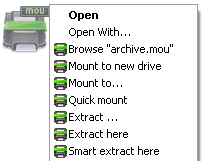
In the Resource Manager, Right-click a ZIP archive, choose "WinMount3 -> extract".
. Extract to... : Select a directory to extract.
. Extract to here: Extract file to the current path.
. Extract to "Filename\": Extract file to the current path and name it "Filename"
. SmartExtract to here: If the archive has several files in it and all the files are not been compressed in a folder, then create a folder to hold these files before extracting.


WinMount formats: