How to mount RAR?

RAR

What is RAR?

Eugene Roshal created the RAR file format, and developed programs for packing and unpacking RAR files, originally for DOS, which were later ported to other platforms.

RAR is a patented archive file format that supports data compression, error recovery, and file spanning. RAR archives are able to handle efficiently split volumes. Before the advent of RAR the most notable such format was ARJ. It can be of a solid format, in which all of the compressed files are treated as a single data block.

The filename extension used by RAR is .rar for the data volume set and .rev for the recovery volume set. In previous versions, if a RAR-archive was broken into many smaller files (a "multi-volume archive"), then the smaller files used the extensions .rar, .r00, .r01, .r02 etc.It can be of a solid format, in which all of the compressed files are treated as a single data block.

There are 4 ways to mount RAR files as a virtual disk:

1. Using file association

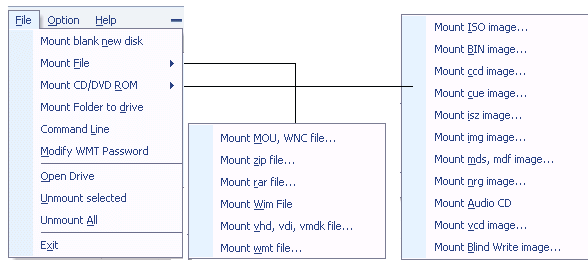
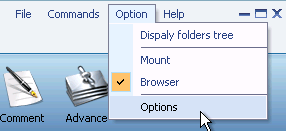
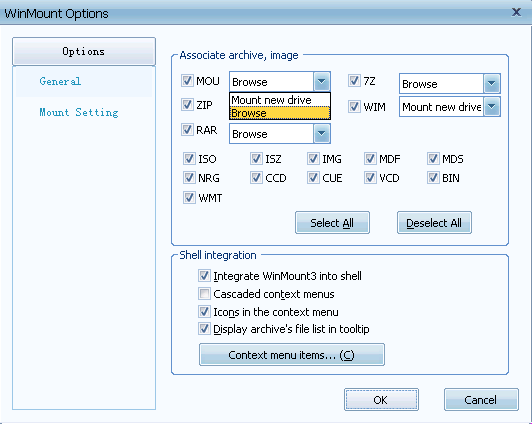
1) Open WinMount main window, Click the "Option" drop down menu, Select "Options-File Association", tip RAR to be associated with Mount.

Set RAR to be associated with Mount

2) Double-click a RAR file, WinMount will mount it to a new virtual disk.

2. Using right-click menu

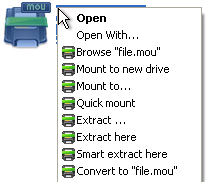
On RAR right-click drop down menu, click "WinMount3 -> Mount to new drive", WinMount will mount it to a new virtual disk.

right-click the RAR file and choose mount

. mount to new drive: mount the RAR file to a new virtual drive.
. mount to...: Assign a disk letter for the RAR file. (Refer to "How to assign a disk?" on the bottom of this page.)

3. Using toolbar

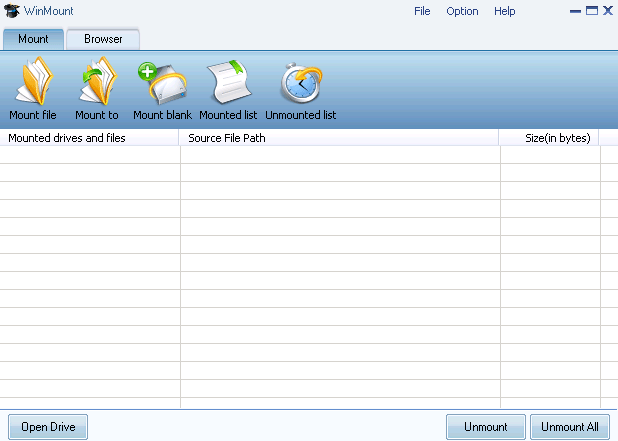
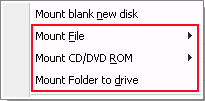
1) Click the button "mount file" on the toolbar of Winmount main interface;

mount toolbar

2) Select a RAR file, click "ok". WinMount will mount it to a new virtual disk.

4. Using drag

Drag a RAR file to Winmount main interface directly, WinMount will mount it to a new virtual disk.

* Mounted drive of rar is writable, but changes will be lost after unmounting.

How to assign a disk?

Of course, you can assign a disk for the RAR file, such as H: or K: or whatever you like.

1) Click the button "mount to" on the toolbar of Winmount main interface( or right-click the RAR file and select "mount to...");

step1: mount RAR to an assigned disk

2) Select a RAR files, select a drive, then Winmount would mount the RAR file to the assigned disk.

Step2: Select a disk and input a path for the RAR file

You can also input a path for the RAR file.
For example, select "H:\" and input "folder\folder1", then the RAR file would be mount to "H:\folder\folder1".

FAQs:

1. How to mount MOU?
2. How to mount ZIP?
3. How to mount RAR?
4. How to mount ISO?
5. How to mount BIN/CUE?
6. How to mount CCD?
7. How to mount BWT?
8. How to mount MDS/MDF?
9. How to mount NRG?
10. How to mount IMG?
11. How to mount ISZ?
12. How to mount APE?
13. How to mount FLAC?
14. How to mount WV?
15. How to mount VHD?
16. How to mount VDI?
17. How to mount VMDK?
18. How to mount WinMount WMT?
19. How to mount Microsoft WIM?

Home | Affiliate | Link to us | Links | Awards | Bug report


© Copyright 2007-2010 WinMount International Inc. All Rights Reserved

Email:support@winmount.com